Seppo guide
Managing your account
How to manage your account using The Dashboard
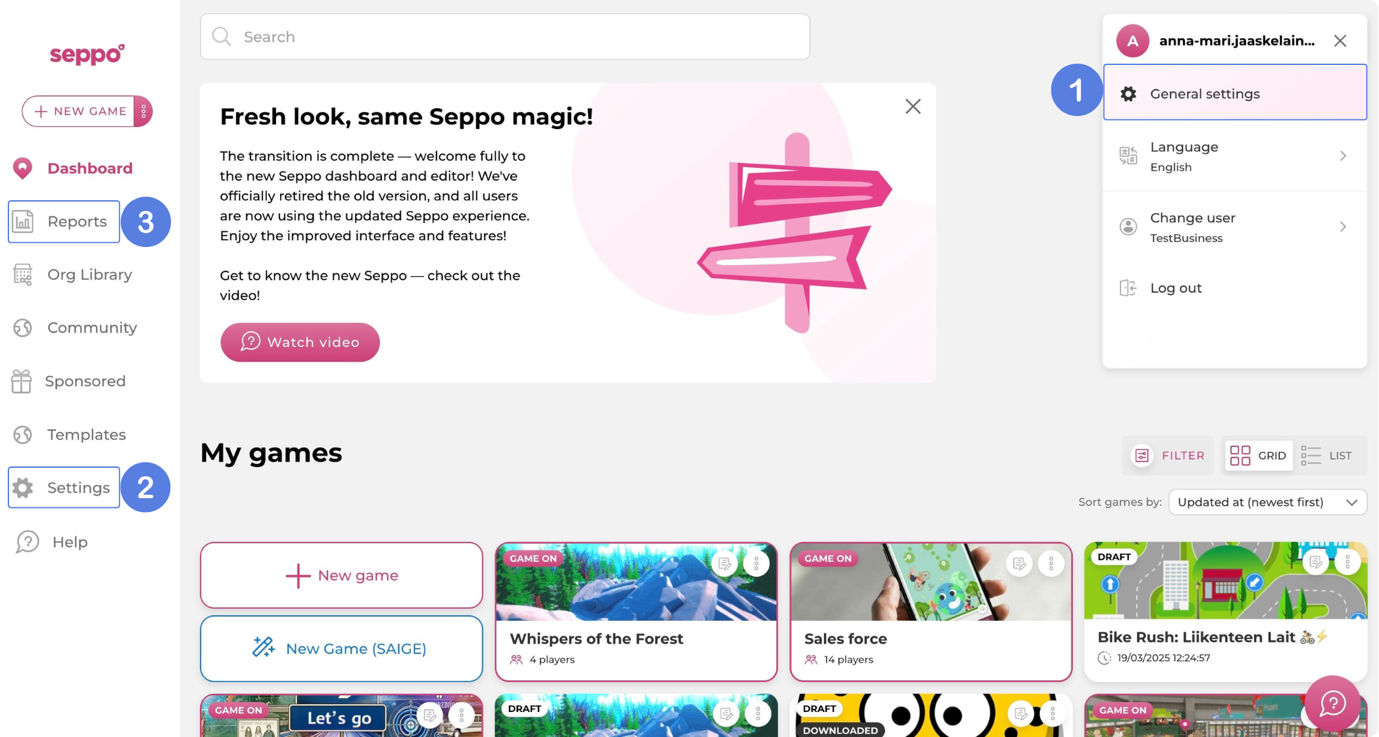
The Dashboard is your central hub in Seppo, providing quick access to all essential settings and administrative tools. The image below highlights three key areas within the dashboard:
1. General settings: Quick access to manage your personal account settings, such as your name, password, and language preferences.
2. Settings: Opens both your General settings and Organisation settings where you can see how many player licences are in use. If you have admin rights, you can also manage your organisatins members, change their roles, and adjust other organisation-wide settings.
3. Reports: Provides access to Seppo’s reporting tools based on your account type:
- Organisation report
- Instructor report
- Sponsored games report
- Player report
These reports offer valuable insights into game activity, player engagement, and overall usage across your organisation, helping you monitor performance and impact effectively.