
Seppo guide
Here you’ll find instructions for using Seppo effectively and making the most of its versatile features. Browse the different sections in the guide menu and quickly locate the information you need.
Asking for a revised answer
How does the asking for a revised answer feature work?
Answers to tasks can be returned to the player for revision. This feature is particularly useful if a player has missed an important detail in the task description or if an incomplete answer was submitted by mistake.
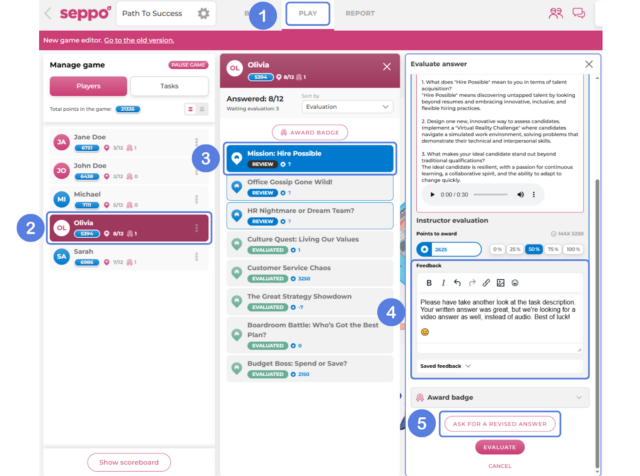
To ask for a revised answer through the Play > Player tab:
1
Navigate to the Play tab.
2
Click a player card from the left-side panel.
3
Open an answer for evaluation view from the middle panel.
4
In the evaluation view, provide feedback for the player, explaining the reason for the revision request.
5
At the bottom of the evaluation panel, click the “Ask for a revised answer” button.

Best practices and tips
Automatically evaluated tasks can also be sent back for revision if you’d like to give the player another chance to improve their result!